When your head is full
Appointments, tasks and priorities have a fixed place in planoid: in the appointment overview, in to-do lists, in the task pool, in notes, and in the focus block. You decide what you want to see of it today.

are you ready to get planoid?
Waitlist launch on August 30, 2026. We are opening planoid first in a controlled way for waitlist members, so we can closely monitor the launch and make sure everything runs reliably. After that, registration will be opened to everyone. With only a few exceptions, the core features are free and include the full range of functionality currently described on this page.
Who it's for
planoid is for people who want to organise their everyday life with structure – without being forced into rigid templates. Instead of yet another planner, you get a flexible, modular system for appointments, tasks, routines, habits and reflection, all in one place.
Appointments, tasks and priorities have a fixed place in planoid: in the appointment overview, in to-do lists, in the task pool, in notes, and in the focus block. You decide what you want to see of it today.
planoid gives you a basic framework of daily, weekly and monthly views. You fill these views with the blocks you need right now, and rearrange them when your life changes.
Fixed templates and empty pages never lasted long for you? planoid is deliberately flexible and visual. You decide which blocks and modules you see and which you don't.
planoid is a personal everyday and life planner – not team or project-management software, and not a planner whose main purpose is decoration.
A full everyday life produces more than one head can hold. Appointments, tasks, errands, ideas, plans. Planning is first and foremost about offloading: out of your head and onto a surface where everything is visible and can be arranged.
Planning is more than managing. Sure, some people get through their everyday life without a planner. Everything just runs on autopilot. The loudest demands win, and what matters to you usually comes last. Those who plan sit down, get an overview and decide instead of only reacting. Planning means actively shaping your own everyday life.
planoid is the place for this kind of everyday shaping. With room for what's coming up, for what matters to you, and for what you want to hold on to.
Behind the scenes, a modular all-in-one life planning app is taking shape for people who want to organize their lives with structure, without giving up a beautiful and thoughtful look.
Monthly, weekly and daily views are made of blocks that you arrange, swap and move freely. No template dictates what your week should look like.
Appointments, tasks, lists, trackers and journal live in one system. You no longer jump between apps or enter anything twice.
Every overview shows exactly the blocks you need right now. Show, hide, rearrange, at any time.
One system creates room for ideas, plans, reviews, and memories. The planning overview follows what you actually need.
Web app
planoid is a web app. You can use it in any internet browser as long as you have an internet connection.
If you want, you can also install planoid as a web app on your phone, tablet, or computer. It then opens like an app while still being browser-based.
We chose this approach deliberately because many people want to use their planner on several devices. Native iPad or Android apps are often difficult or impossible to synchronize cleanly. planoid avoids that problem: thanks to the mobile view, your information is also available on your smartphone whenever you are online.
How the plnoid works
Whether you need a broad yearly view, concrete weekly planning, or daily tasks: you combine the views, building blocks, and extensions that fit your everyday life.
You create a monthly overview, weekly overview, daily overview, or all of them together, depending on how you plan. A yearly overview and an appointment list are included as well. You can switch or combine them at any time.
Every overview already includes an appointment area, so you can start entering appointments right away. You enter an appointment once and show or hide it in every other view. Nothing is created twice, nothing needs copying over. That is exactly what paper can't do.
Building blocks are a core part of the planner. In every view, you can add as many blocks as you need, for example for tasks, your focus topic, trackers, tables, images, and more.
At the end of each week and month, you can take time to reflect: what went well, what did not, and what do you want to take into the next period? A question catalog is included and can be expanded, along with a place to collect concrete next steps.
Planning and reflection with building blocks form the core of the app. If you need more, you can unlock modules: journaling for diary entries, milestones for special events in images, personal dashboards for lists and plans without a direct time reference, and yearly reviews for tracker entries.
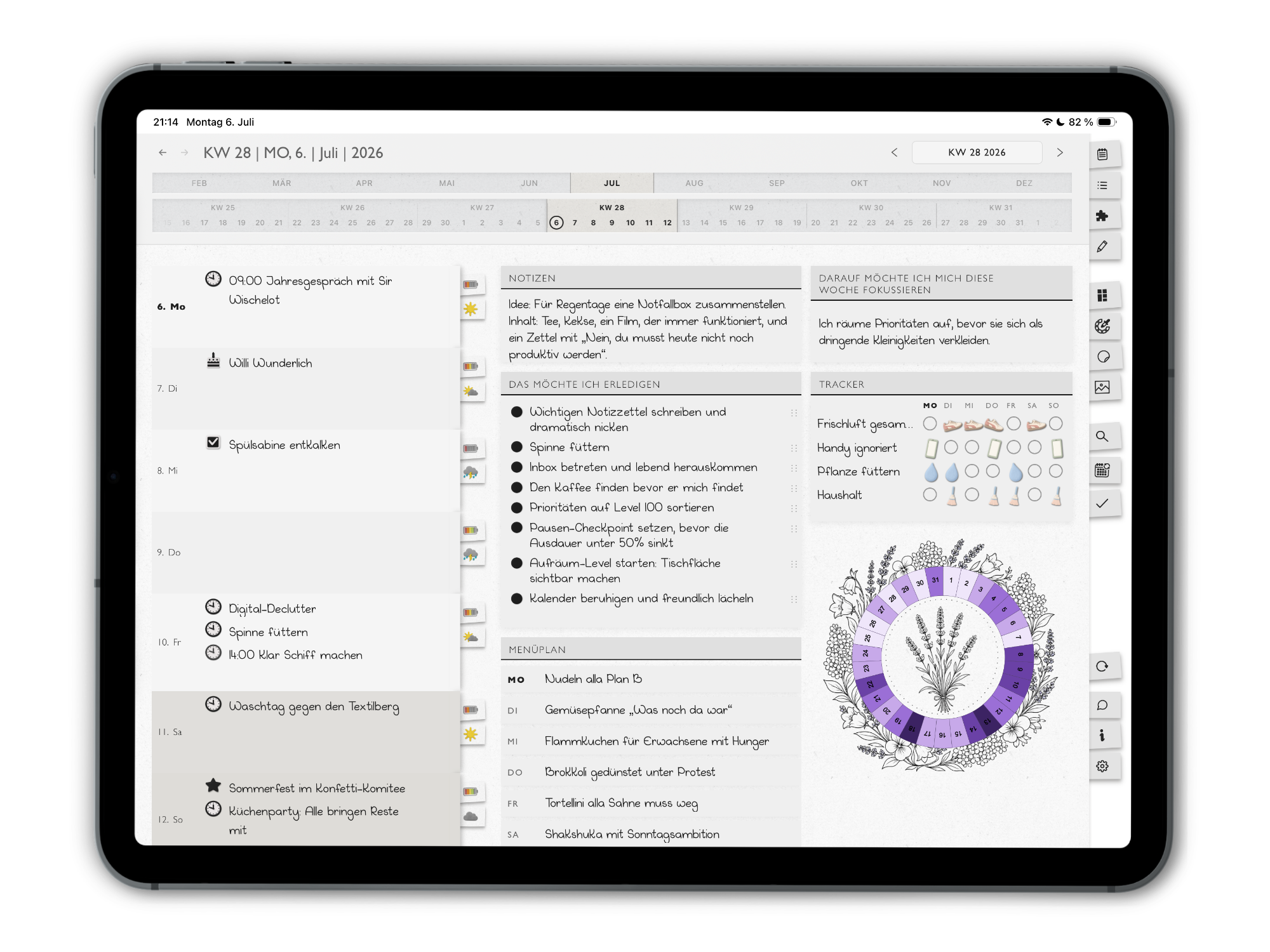
The weekly plan keeps your whole week in view: appointments, tasks and your most important top-3 priorities. With flexible blocks like focus, notes or trackers, you set up your weekly planning exactly the way you need it – and move open tasks into the next week with one click. Even the controls draw on paper: the menu bar on the right edge is designed like the index tabs of a paper planner.
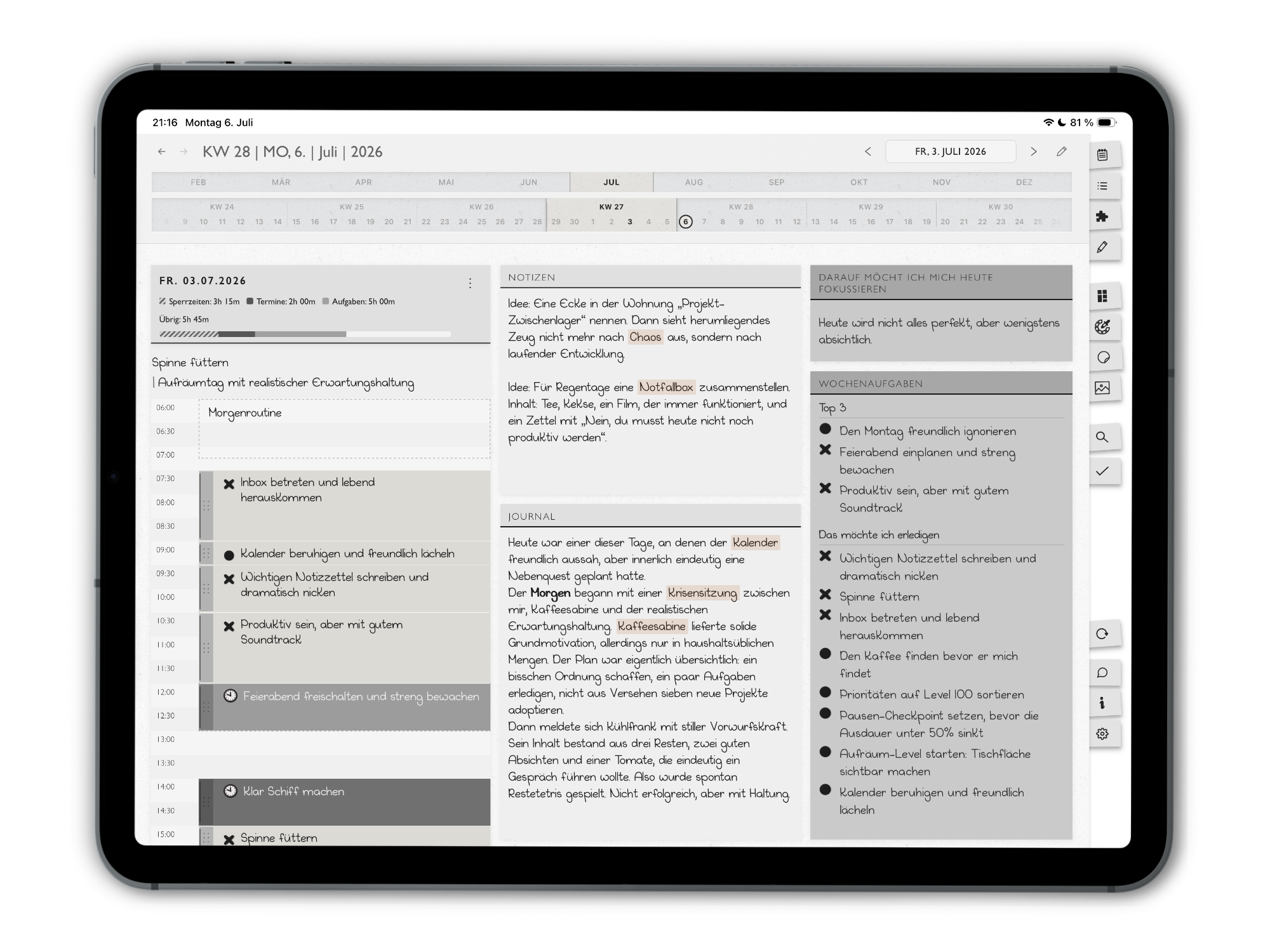
The daily plan gives your day structure: on the timeline you schedule appointments and drag tasks from the task pool into concrete time blocks. Routines, journal and a short daily reflection fit here too, right next to your daily focus.
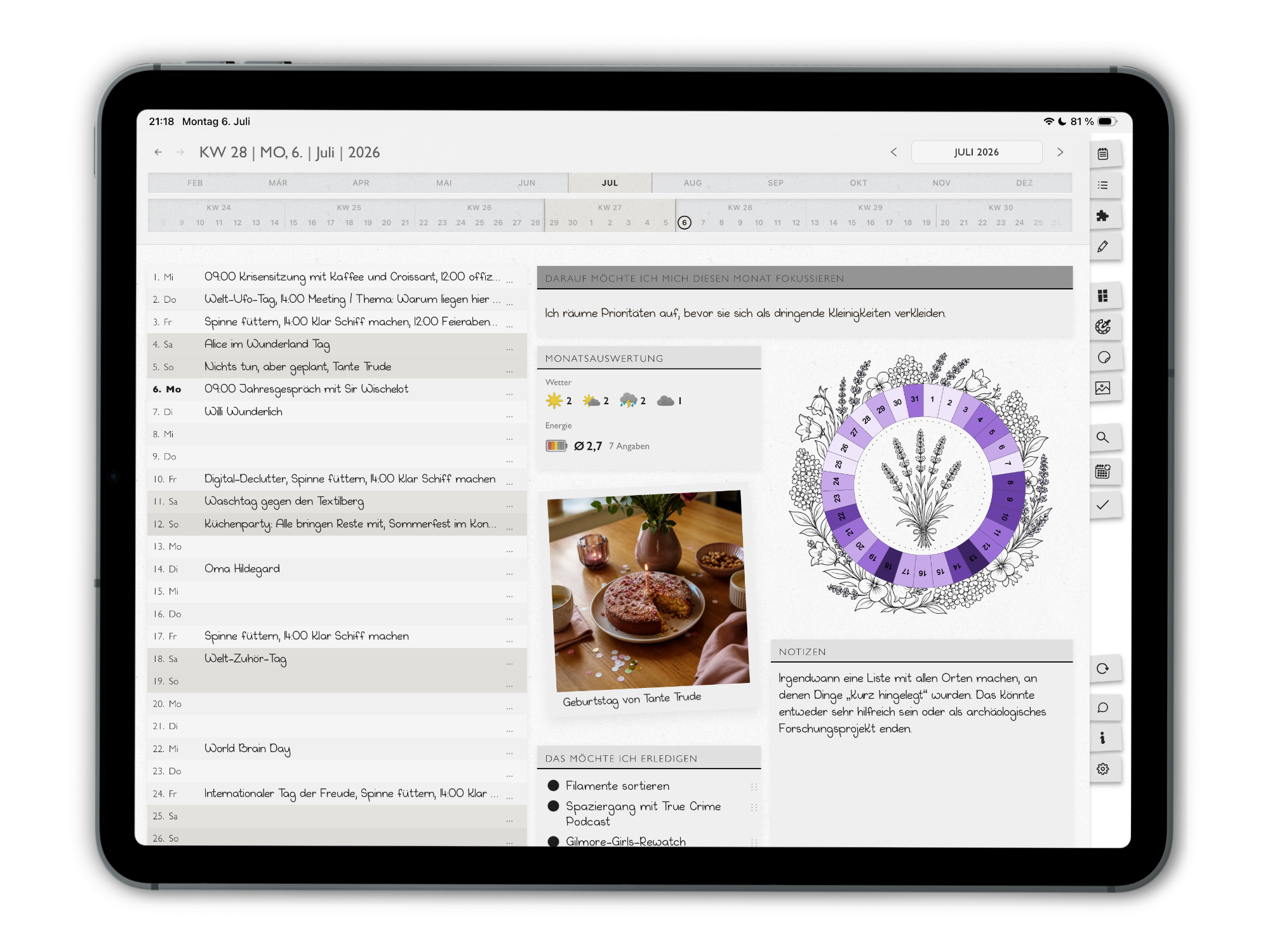
The monthly plan shows you the entire month at a glance: appointments, goals and your monthly focus. With freely arrangeable blocks you extend your monthly overview with trackers and notes, so you can see what's coming up – without getting lost in the details.
Block Library
The app works with flexible building blocks that you can use depending on the view, life area, and planning style. This creates a system that adapts flexibly to your everyday life.
To keep track of your tasks, you can use as many task blocks as you like. Tasks can be marked as open, done, moved, or crossed out. Open tasks can be moved into the next week with one click.
Tasks from your weekly planning are automatically collected in the task pool of your daily planning. From there, you drag them into time blocks on your timeline.
The Top 3 are a special task list. This is where you enter the three most important tasks of the week. They are highlighted in the task pool.
This is where you set your monthly or weekly focus and capture what you want to direct your attention toward.
Here you can enter three priorities for a week or month that are not concrete tasks.
With this block, you can add memory photos and capture small moments directly inside your planning.
Milestones contain photos of special events from the year. In the milestone dashboard, you can combine them into a yearly collage of your personal highlights.
A clear place for your weekly meal plan.
A free-text block for notes. Text sections can be marked with a highlighter or emphasized in bold. You can also add links.
A block in the daily view that lets you capture diary entries as text. Here too, you can highlight text, make it bold, or add links.
A block in the daily view that lets you do a quick reflection with a rating and tags.
A visual monthly tracker for your mood.
Create tables for all kinds of situations, from quick overviews to detailed collections.
Track your daily habits and keep an eye on what you want to do regularly.
This block gives you space for decorative images and different ways to display them.
Expandable Modules
The modules extend the core of the app with dedicated areas for journaling, memories, dashboards, and reviews. This lets you unlock additional functionality without overloading your basic structure.
In addition to the journal block, the journal dashboard gives you room to design diary entries creatively with stickers, images, and text. Entries are synchronized between the journal block and journal dashboard. There is also an option for short entries in the form of "One Line a Day".
In the collection area for all milestone images, you can arrange your photos freely as polaroids, decorate them with stickers, and create a yearly review of your milestones.
Many blocks from the time-based overviews are also available in dashboards. There, you can create as many overviews as you like to collect lists, notes, tables, images, and much more for topics and projects that are not directly tied to a planning period.
You can track mood, habits, weather, and energy level in the planner. You can also set monthly and weekly focus topics and complete a quick reflection with a rating in the daily overview. These data points can be displayed in different blocks in the yearly review and partly connected with each other.
Design
Planning is personal. If you plan your own everyday life in a tool that looks like office software, your life quickly starts to feel like work. That's why planoid looks like a planner and not like software: paper look, handwriting-style font, tape strips and textures. A beautiful notebook doesn't make anyone a writer, but it invites you to write. In the same way, planoid invites you to plan. With nine themes, stickers, washi tapes and text tapes, you make the planner your own.
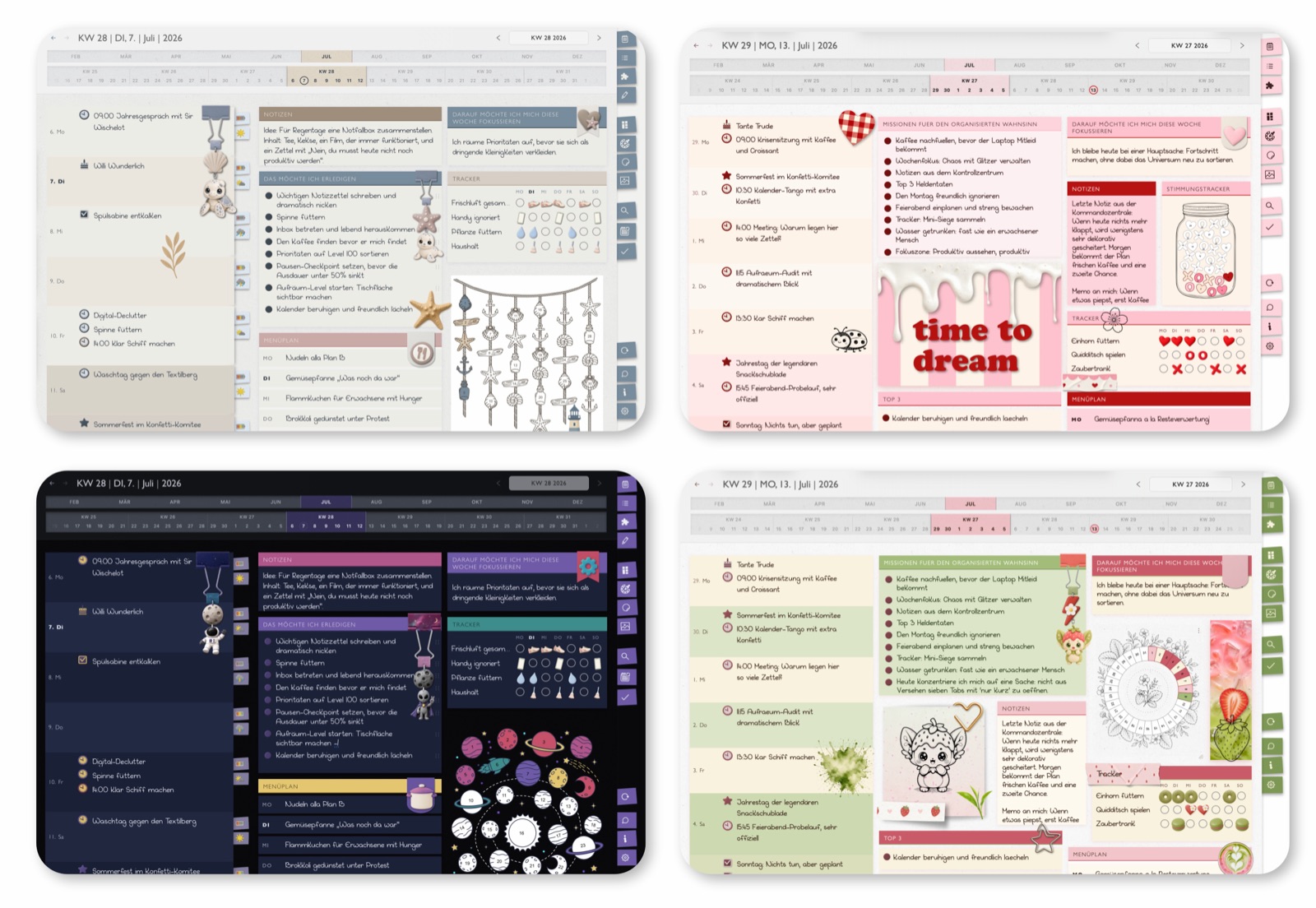
So you can adapt the app to your mood and preferences, it comes with nine designs including stickers, decorative images, and tracker icons. More designs will be added continuously.
With one click, you can change the entire look of the app or only the design of the month, week, day, or section you are currently in.
Every design theme includes a set of stickers that match the respective color theme. There are also functional tracker stickers for mood, energy, and weather that can be assigned to a day and create an entry for that day.
Beyond that, there are text tapes, washi tapes, and text pearls with many customization options. You can also link stickers to other areas of the planner and create your own buttons.
Tester Feedback
Insights from testing the app: honest, practical, and based on everyday use.
The app quickly became part of my routine and helped me enormously to keep an overview, reflect, and capture beautiful moments. It is beautifully designed and offers many ways to adapt it visually and organizationally to my own needs. I have depression, and the routine really helped me track my energy, mood, and everyday things. This app has become an indispensable everyday companion for me.
The app was not developed to compete on the market; with its wide range of possibilities, it has no competition. The developer put everything into this app that matters to her personally, and that makes it an incredibly comprehensive tool for enriching your life and mine.
It is an incredibly wonderful app. You can feel and find so, so much love for detail here. Five stars deluxe.
This planner and journaling app completely won me over. It offers a wide range of ways to capture what is important and to plan the day, the week, and the month. I especially like that each day can have a completely individual look with the help of widgets.

I love planning my everyday life. As a woman with ADHD, I need it to move through the day with at least some orientation and structure. Over all the years in which I tried all kinds of planners and systems, one thing became increasingly clear: life cannot be squeezed into rigid templates.
That is why I started asking what a companion would look like that is as flexible as my life. One that gives me structure without restricting me. One that helps me find out every week what I want to focus on and shows me what is coming up and what matters right now. And one that keeps the charm of a paper planner – with cards, tapes and stickers instead of a sober app look.
planoid won't automatically make your life more organised, no app can honestly promise that. What planoid gives you is a home for your planning: a framework you set up, rearrange and keep, instead of giving up on yet another system.
FAQ
This is a deliberate design decision: visually, planoid draws on analog paper planners instead of modern productivity apps. Buttons, menus and tabs are designed, as far as possible, in the style of paper cards, tape strips, index tabs and other stationery.
Paper textures and a handwriting-style font reinforce this feeling. As a result, the app feels calm and familiar – like a beautiful paper planner, only more flexible and always at hand.